Small group management software should make it easier for leaders to know people, record attendance, follow up well and ask for support. It should not turn volunteer leaders into administrators or create another database that church staff have to maintain.
That sounds simple, but small group tools are often evaluated by the length of their feature lists. Churches compare calendars, forms, messaging, group finders and reports, then discover that the real challenge is adoption. If leaders do not use the system consistently, even excellent software produces an incomplete picture.
A better buying process starts with ministry outcomes. What should become easier for a group leader on Monday morning? What should a small groups pastor be able to notice before a person quietly drifts? What information genuinely helps senior leaders support groups without micromanaging them?
Start with the problem your church is trying to solve
Two churches may search for the same software and need very different things. One church may need public group discovery and online sign-up. Another may already manage groups in Planning Center but need better attendance, prayer and pastoral follow-up. A multi-campus church may need consistent reporting across locations. A smaller church may simply need to replace scattered spreadsheets and messages.
Before comparing products, write down the three ministry problems that matter most. Common examples include:
- leaders forgetting to submit attendance;
- people missing several meetings without timely follow-up;
- prayer requests and care notes becoming lost in chat threads;
- senior leaders seeing totals but not knowing which groups need support;
- group information being duplicated across several systems;
- volunteer leaders finding existing software too complicated on a phone.
This list becomes your evaluation filter. A product can have many impressive features and still be wrong for the actual gap in your church.
Make volunteer leader adoption the first requirement
The most important small group software user is often not the database administrator. It is the volunteer leader opening the app after a long workday, between family responsibilities and the next group meeting.
Ask leaders to test the everyday workflow during a trial. Can they see their people quickly? Can they record attendance in under a minute? Can they add a prayer request or care note without navigating a complicated back office? Can they understand what needs attention without training?
Mobile access matters, but a mobile app alone does not guarantee simplicity. Count the number of decisions and screens required for common tasks. Software that feels light to an administrator can still feel heavy to a volunteer.
Attendance should lead to care, not stop at a total
Most church group software can record attendance. The more useful question is what happens after attendance is entered.
A healthy system should help leaders notice patterns without treating every absence as a crisis. One missed week may mean travel, illness or shift work. Repeated absence combined with no recent contact may be a meaningful care signal. The software should provide context and prompt a human response rather than label a person automatically.
Look for a clear connection between small group attendance tracking and follow-up. Can a leader see who has become less connected? Can senior leaders distinguish missing reports from genuine attendance changes? Can the church view unique people as well as total attendance?
Choose software that remembers the whole person
Small group ministry is not only a roster and a meeting schedule. People share prayer needs, experience life changes, receive care, celebrate answered prayer and take steps in discipleship. Good software helps leaders retain enough context to care consistently.
Useful people-centred features may include:
- prayer requests and answered prayer notes;
- care tasks and follow-up reminders;
- pastoral alerts for concerns that need senior support;
- a simple history of meaningful care and life moments;
- contact rhythm reminders;
- role-based access to sensitive information.
The purpose is not to document every conversation. It is to help the right leader remember what matters and follow through with care.
Look for leader support without surveillance
Small groups pastors need visibility, but volunteer leaders need trust. Software should help a church see where support may be needed without creating a culture in which every leader feels monitored.
Healthy reporting focuses on ministry signals: attendance rhythms, overdue reports, people who may need contact, active care concerns and leader feedback. It should help a coach or pastor ask a better question, not make a final judgement from a dashboard.
For example, a group with missing attendance may have paused for a holiday, changed meeting day or simply forgotten the report. The data should begin a conversation. It should not replace one.
Decide whether you need an all-in-one system or a care layer
Some churches need an all-in-one church management system with giving, event registration, forms, child check-in, public group search and communication. Other churches already have those functions and do not want to replace them.
In that case, a focused care and discipleship layer can be a better fit. My12 is designed for churches that want to connect group attendance, people care, prayer, leader rhythms and senior visibility. It can work alongside existing church systems rather than asking a church to rebuild everything.
If your church already uses Planning Center, check whether the product can reuse your existing structure. A practical Planning Center integration can reduce duplicate setup for people, groups, leaders and campuses.
Check permissions, privacy and pastoral data handling
Small group systems can hold sensitive information. Prayer requests, health concerns, family situations and pastoral notes should not be visible simply because someone has general access to the church database.
Ask each provider how access is separated between group leaders, campus leaders, organisation administrators and platform staff. Confirm how accounts are protected, how data is retained, whether the organisation controls its records and how the platform approaches privacy obligations such as UK GDPR.
Also agree on your own church practice. Leaders should know what belongs in a care record, what should remain in a private pastoral conversation and when a safeguarding or emergency concern must follow the church's formal process instead of an ordinary software workflow.
Test reporting with real ministry questions
A dashboard can look attractive while answering very little. During a trial, use real questions from your church:
- Which groups have not reported this week?
- Which people have become less connected over the last month?
- Which leaders are carrying several active care situations?
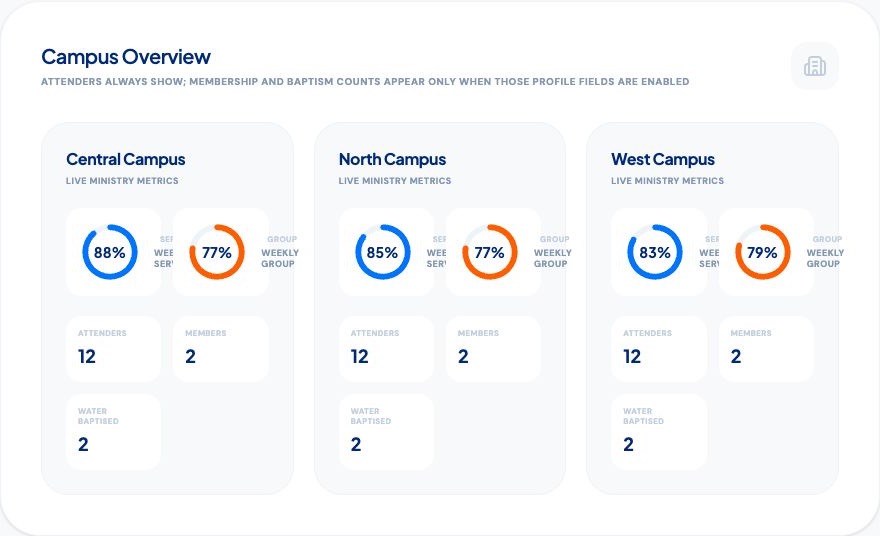
- How does group health differ across campuses?
- Are we seeing more unique people connected to groups?
- Can leaders raise concerns and receive support quickly?
If the software cannot answer the questions your team actually asks, additional charts will not make it more useful.
Plan a small rollout before a church-wide launch
Choose a small number of leaders who represent different levels of confidence with technology. Run the system for several group cycles and watch where they hesitate. Ask what they stopped doing, what became easier and what still happened in WhatsApp or on paper.
A useful pilot measures behaviour rather than enthusiasm. Leaders may say they like a system during a demonstration, but consistent weekly use is the real test. Keep the initial rhythm narrow: people, attendance, prayer, care and one clear follow-up action.
A practical small group software checklist
Before making a decision, check whether the platform:
- is genuinely easy for volunteer leaders on mobile;
- connects attendance to personal follow-up;
- supports prayer, care and meaningful people history;
- gives senior leaders useful visibility without micromanagement;
- protects sensitive pastoral information with clear permissions;
- works with the systems your church already relies on;
- provides useful answers, not only attractive totals;
- can be tested with a real group before a full rollout.
How My12 approaches small group management
My12 treats small group management as a care rhythm. Leaders can keep people, attendance, prayer, care actions and meaningful moments connected. Senior leaders can see group and leader health across the organisation while keeping the next action relational.
My12 is not trying to replace every church administration tool. It is built to help churches notice people, support leaders and turn scattered ministry signals into thoughtful follow-up. Explore the My12 small group management software page, or read how discipleship software supports small group leaders.
The right software should reduce the distance between noticing and caring. If leaders can use it naturally and pastors can see where support is needed, technology becomes part of a healthier ministry rhythm rather than another task to maintain.